

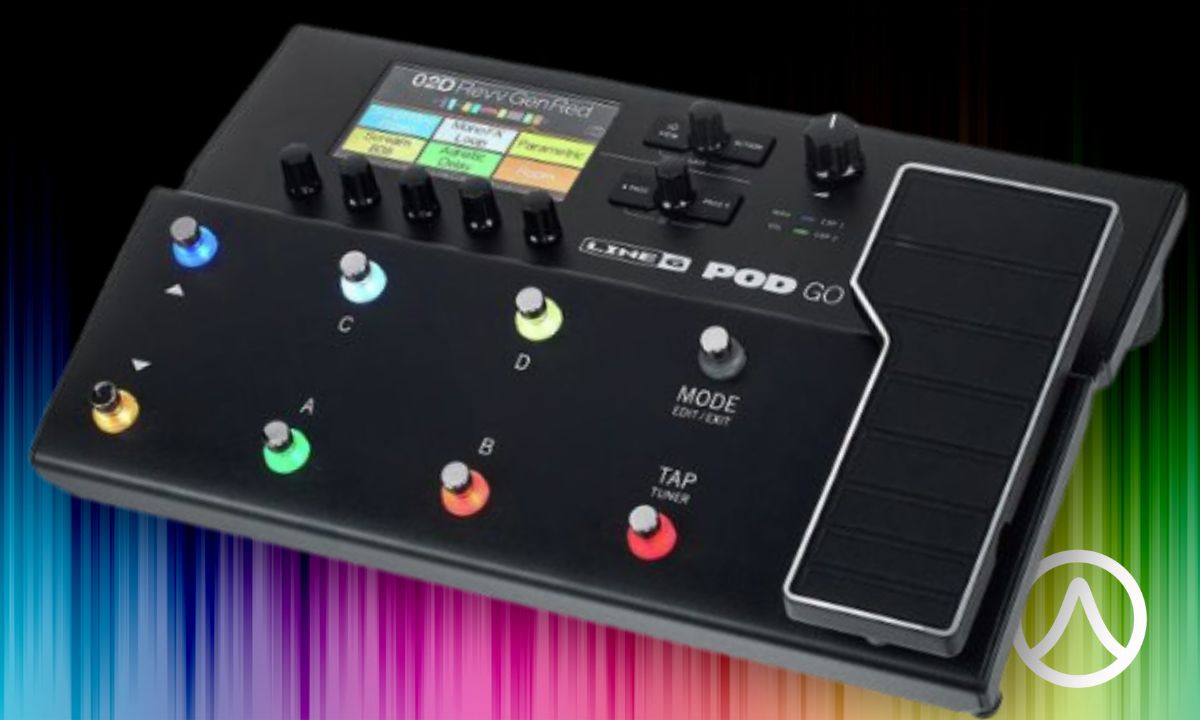
The Line 6 POD Go still makes a lot of sense in 2026, but not because it is the cheapest route into amp modeling. It isn’t anymore.
Its real advantage is the way everything fits together. You get HX-derived amp and effects models, a color screen, eight footswitches, an expression pedal, snapshots, impulse-response support, USB recording, an effects loop, and enough physical control to build a complete guitar rig without carrying a separate pedalboard.
That convenience comes with a deliberate limitation: POD Go has a more restricted signal architecture than Line 6’s HX and Helix processors.
For plenty of players, that barely matters.
For others, it changes the entire buying decision.
This review explains that difference, what POD Go does well, where its limits actually become noticeable, and what to check before buying a used unit.
What the Line 6 POD Go Actually Gives You
POD Go takes much of Line 6’s HX amp, cabinet, and effects ecosystem and puts it into a streamlined floor processor built around faster operation rather than maximum routing freedom.
The hardware is compact enough to work as a self-contained pedalboard. Line 6 lists the standard POD Go at roughly 14.1 inches wide, 9.1 inches deep, 3.5 inches high, and 5.2 pounds. Its construction combines a folded-steel top panel, cast-aluminum expression treadle, and ABS polycarbonate underside.
You get eight footswitches, a built-in expression pedal, a 4.3-inch color display, stereo main outputs, a dedicated Amp Out, headphones, USB, and a routable stereo send/return loop.
That last group of connections matters more than it initially appears.
POD Go can operate as a direct modeler feeding a PA system, a recording interface sitting next to a laptop, an effects processor in front of an amplifier, or the control center of a four-cable-method rig. Line 6 also specifies a 4-in/4-out USB audio/MIDI interface with re-amping support.
There is also third-party impulse-response support. The current POD Go manual says the unit stores up to 128 custom or third-party IRs, giving players another route for changing cabinet and speaker behavior beyond the onboard models.
So POD Go isn’t simply a large multi-effects pedal.
It can replace several separate parts of a conventional rig.
The Current POD Go Is More Capable Than the 2020 Version
Old POD Go reviews need context.
The hardware launched years ago, but Line 6 continued developing the software platform. Firmware 2.0 brought a redesigned cabinet engine alongside new amps and effects, while firmware 2.50 added another 11 guitar amps, two bass amps, 11 guitar cabinets, two bass cabinets, two effects, improvements, and bug fixes.
As of September 2026, Line 6 still lists firmware 2.50.0 as the latest POD Go firmware download.
That creates an odd situation for used buyers.
You can buy the same physical processor reviewed in 2020, update it, and end up with a significantly broader modeling library than that original review describes.
Firmware therefore belongs on the used-buying checklist. A seller running an older version isn’t necessarily offering inferior hardware — but you need to know whether the unit updates correctly and communicates properly with POD Go Edit before handing over your money.
How Good Is POD Go in Actual Use?
POD Go’s strongest feature is not one specific amplifier model or delay algorithm. It is how quickly the hardware turns digital modeling into something that still behaves like a guitar rig.
That distinction matters.
Some modelers feel like compact computers that happen to sit on the floor. POD Go leans harder toward familiar pedalboard behavior: step on switches, move an expression pedal, change snapshots, look at a large display, and make edits without immediately reaching for a computer.
Independent reviews have consistently highlighted the sound library, portability, straightforward interface, and physical controls as major strengths, while identifying the restricted signal architecture as the main tradeoff.
That makes POD Go particularly effective when the player’s rig already matches its assumptions.
Direct to PA, FRFR, or Studio Monitors
This is where POD Go’s complete amp-and-cab modeling architecture makes the most sense.
Run the main outputs into an appropriate full-range system, studio monitors, or front-of-house input, and the POD Go becomes the whole signal chain: effects, amplifier, speaker cabinet, and output processing.
Line 6 says the main outputs support balanced or unbalanced operation, and the company specifically describes sending them to a front-of-house mixer while using Amp Out separately for an onstage amplifier.
That flexibility is useful for gigging.
You can send the modeled signal to the PA while keeping another stage feed available, rather than forcing one output arrangement to handle every destination.
The important part is understanding the cabinet stage. A modeled guitar cabinet or IR makes sense when you’re feeding a PA, FRFR speaker, or studio monitor because those systems are intended to reproduce the complete modeled signal.
A traditional guitar cabinet already supplies its own speaker coloration.
Stacking another simulated guitar cabinet on top often changes the result dramatically, which is why POD Go lets you configure Amp Out around the cab/IR section.
Running POD Go Through a Guitar Amp
POD Go works with a conventional amplifier, but there is no single correct connection for every rig.
The simplest approach is running into the amplifier’s normal input. In that arrangement, the guitar signal passes through POD Go and then through the amp’s own preamp, power section, and speaker.
That works well when you mainly want POD Go for effects.
If you want the modeled amplifier to do more of the tonal work, connecting to an amplifier’s effects return can bypass much of the physical amp’s preamp coloration. Your real amplifier then acts more like a power stage driving the speaker cabinet.
Four-cable method goes further.
Line 6 specifically supports 4CM through POD Go’s send/return connections. The arrangement places selected POD Go effects before the real amplifier’s preamp while putting other effects after it in the amp’s effects loop.
This is useful for the classic division between drives and wah before the preamp, then delay and reverb after it.
POD Go can also switch between the real amplifier’s preamp and a modeled preamp inside a preset, giving a traditional amp rig considerably more flexibility than a normal pedalboard.
Recording Through USB
POD Go is also an audio interface.
That sounds like a secondary convenience until you build a small home setup and realize the processor can handle your guitar tones, USB connection, monitoring, editing, and re-amping without another guitar-specific box.
Line 6 specifies a 4-in/4-out USB audio/MIDI interface with re-amping built in.
Re-amping is especially useful.
Instead of permanently committing to one modeled amplifier while recording, you can preserve a dry guitar signal and process it again later. That makes POD Go much more useful for recording than a simple stereo effects pedal with USB tacked onto the side.
POD Go Edit handles the computer-side management. It lets you work with presets, IR libraries, backups, and firmware rather than doing every maintenance task from the hardware itself.
The Signal-Chain Limitation Matters More Than the Model Count
This is the part that deserves more attention than another list of amplifier models.
Every POD Go preset contains a defined structure. Line 6 documents an input/noise gate, amp or preamp block, cab or IR, preset EQ, wah, volume, effects loop, and up to four additional effects blocks.
Those four open effects positions give you substantial freedom.
But they are not the same thing as an unrestricted Helix signal path.
You cannot simply erase every predefined component and rebuild the entire architecture from zero. POD Go also lacks the parallel signal routing and dual-DSP flexibility associated with larger Helix systems. Line 6 has been explicit that some of those power-user features were omitted to create a simpler, less expensive platform.
The question isn’t whether that is objectively bad.
The question is whether your presets regularly demand more.
When Those Limits Barely Matter
Consider a conventional live guitar preset.
You need an amp, cabinet, overdrive, modulation effect, delay, reverb, volume control, and perhaps a wah.
That’s a substantial rig.
It also fits the POD Go design remarkably well because several core functions already have dedicated positions. You aren’t consuming every available block just to construct the foundation.
Snapshots make that architecture even more useful.
Instead of building a completely different preset for every part of a song, snapshots let you change multiple parameters and bypass states inside the same preset. A clean verse, driven chorus, and louder delay-heavy lead sound do not necessarily require three entirely separate rigs.
For players who think in terms of traditional amp-and-pedalboard layouts, POD Go’s restrictions often disappear into the workflow.
That’s the key.
A limitation that never interferes with your actual presets isn’t much of a limitation.
When They Become a Real Constraint
The architecture gets tighter when the signal chain becomes the creative instrument.
Imagine stacking pitch processing, multiple delays, modulation, ambient reverb, drive, compression, and unusual switching arrangements while also wanting more advanced routing between them.
Four flexible effects positions start disappearing quickly.
Parallel processing creates another boundary. Players who want independent wet and dry paths, dual-amp structures, elaborate stereo branches, or other routing experiments are working against the basic POD Go concept rather than with it.
DSP also matters.
Some algorithms require more processing than others, so the theoretical number of available blocks does not guarantee that every combination of demanding effects will fit.
This is why model count alone is such a poor way to compare modern processors.
Two units can share many of the same sounds while providing completely different amounts of freedom for arranging them.
POD Go vs. HX Stomp, Helix, and POD Express
These processors overlap, but they solve different problems.
| Processor | Main Strength | Main Tradeoff | Best Fit |
|---|---|---|---|
| POD Go | Integrated expression pedal, large floor controls, streamlined HX-based rig | More constrained signal architecture | Player wanting one complete floorboard |
| HX Stomp | Compact size and deeper integration into pedalboards | Less onboard foot-control surface without expansion | Player combining modeling with an existing pedalboard |
| Helix family | Deeper routing, control, I/O, and complex signal design | Larger and generally more expensive | Player building sophisticated all-digital rigs |
| POD Express | Small, simple, inexpensive modeler/effects platform | Far less physical control and editing depth | Player prioritizing portability and simplicity |
The biggest mistake is treating this as a ladder where spending more automatically gives every guitarist a better rig.
It doesn’t.
POD Go has an integrated expression pedal and enough footswitches to operate like a complete stage board. HX Stomp is much smaller and fits into conventional pedalboards beautifully, but the smaller enclosure naturally changes how much direct foot control sits in front of you.
Line 6 Helix Floor offers significantly deeper architecture.
That matters enormously to the player who uses it.
It adds much less to the guitarist whose entire show lives comfortably inside straightforward amp, drive, modulation, delay, and reverb presets.
POD Express goes the opposite direction. It strips the concept down further, trading editing depth and large-stage control for portability and price.
Choose around the rig first.
The product hierarchy makes more sense after that.
POD Go vs. POD Go Wireless
POD Go Wireless is fundamentally the same idea with Line 6 Relay wireless functionality integrated into the processor.
The current retail difference is straightforward. As of September 2026, Sweetwater lists the standard POD Go at $599.99 and POD Go Wireless at $699.99.
The Wireless version includes an integrated system rated for up to a 100-foot operating range by the retailer.
For a gigging player who already intends to buy a wireless system, that integration has obvious appeal. One processor handles the modeler, pedalboard, expression control, and guitar wireless connection.
For a studio player sitting six feet from the desk, the extra hardware solves a problem that barely exists.
Used pricing needs the same distinction.
A standard POD Go and POD Go Wireless are not directly comparable listings. If the transmitter is missing from a Wireless unit, that absence deserves to be reflected in the price.
What to Check Before Buying a Used Line 6 POD Go
A used digital processor needs a different inspection from a normal analog pedal.
An analog overdrive can look ugly and still work perfectly because the core job is simple. POD Go combines mechanical controls, a display, converters, USB communication, software, multiple audio jacks, digital processing, an expression pedal, and power hardware in one chassis.
Test those systems separately.
Inspect the Chassis, Pedal, and Footswitches
Start with the obvious physical wear, but don’t stop at scratches.
Rock the expression pedal through its full travel. It should move smoothly, register throughout the sweep, and engage its toe-switch function properly.
Then test every footswitch repeatedly.
Watch the display and LED indicators as you work through presets, snapshots, and stomp assignments. One successful press isn’t enough to establish that a heavily used stage switch behaves consistently.
Turn every knob.
Push every encoder that also functions as a button.
An encoder that skips values, moves unpredictably, or only responds when pressed at a specific angle deserves attention. Digital hardware relies heavily on these controls, so seemingly minor interface problems become annoying very quickly once you’re building presets.
Inspect the screen for dead areas, unusual lines, flicker, or damage.
Then look around the jacks for impact marks.
A clean top panel tells you less than a scarred output jack where a plugged-in cable absorbed a stage impact.
Test Every Audio Connection
Do not plug a guitar in, hear sound from the headphones, and declare the unit healthy.
Test the connections you are paying for.
That means checking:
- Guitar In
- Main Out left and right
- Amp Out
- headphones
- FX Send
- FX Return
- USB
- external expression/footswitch functionality where practical
The effects loop deserves special attention because many sellers never use it.
Line 6 notes that enabling an FX Loop block without anything connected can mute the signal, which is normal behavior rather than evidence of a broken unit.
Know the difference before troubleshooting somebody else’s preset in a parking lot.
For a Wireless model, test the wireless system separately from the normal guitar input.
Verify USB, POD Go Edit, and Firmware
A laptop is one of the best inspection tools for a used POD Go.
Connect the processor over USB and confirm that POD Go Edit recognizes it.
Check the installed firmware.
As of September 2026, Line 6’s download page lists 2.50.0 as the current POD Go firmware. The company recommends the release for POD Go and POD Go Wireless users.
An older firmware version is not automatically a problem.
Failure to communicate with the editor or complete a normal update is more concerning.
This test also gives you the opportunity to confirm preset communication and, if the seller permits it, backup behavior.
Confirm the Power Supply and Accessories
Get the correct power supply.
Do not treat a connector that happens to fit as proof of electrical compatibility.
Digital processors draw considerably more power than many ordinary stompboxes, and voltage, polarity, current capacity, and connector dimensions all matter.
If you’re comparing two used listings with similar prices, the one that includes the correct original supply carries less uncertainty.
The same logic applies to a Wireless unit’s transmitter.
A missing box is mostly cosmetic.
A missing component required to use the feature you’re paying extra for is not.
Treat Reported Hardware Issues as Inspection Targets, Not Universal Defects
Used-gear research gets messy fast because forum anecdotes tend to turn into folklore.
Someone has a noisy input, sticky switch, worn encoder, questionable expression pedal, or USB problem. The story gets repeated, then eventually becomes “all early ones do this.”
That leap needs evidence.
The smarter approach is simpler: turn repeated owner complaints into inspection points.
If multiple users mention an encoder problem, test the encoders carefully. If someone describes an input issue, test the input under realistic conditions. If USB communication appears in troubleshooting threads, bring a computer.
You’re buying the unit in front of you.
Test that unit.
How Much Should You Pay for a Used POD Go?
Start with the new price, then work backward from actual condition.
As of September 2026, a new standard POD Go is listed at $599.99 by Sweetwater. Current Guitar Center used inventory shows standard POD Go units around $300 to $370, depending on condition and individual listing.
That is useful market context, but there is an important distinction:
Those Guitar Center numbers are current asking prices, not confirmed completed-sale prices.
A fair private-party purchase often requires another layer of research.
Look for recent completed sales where available. Match the exact version, condition, included power supply, accessories, and shipping situation rather than comparing one bare unit to a boxed example from a retailer offering returns.
Then inspect what you’re buying.
A pristine $350 POD Go that includes the proper supply and passes every control, connection, USB, and expression-pedal test can be a better purchase than a $275 unit with vague history and an intermittent encoder.
Price follows risk.
For POD Go Wireless, keep the comparison separate. Current Guitar Center listings show used Wireless examples around $450, while Sweetwater currently lists the model new at $699.99.
Again, asking prices are evidence of the active market — not proof that every unit actually sells there.
Who the POD Go Makes the Most Sense For
POD Go is strongest when you want one box to behave like a complete guitar rig.
That includes gigging players who want to arrive with a guitar and floorboard, run directly to a PA, and still have real switches plus an expression pedal underfoot.
Home recordists get another strong use case.
The USB interface, amp modeling, effects, IR capability, headphones, editor, and re-amping functionality cover a surprisingly complete recording workflow without another guitar processor.
It also works well as a first serious modeler.
The architecture is deep enough to teach you how amp models, cabinets, IRs, snapshots, routing, and gain staging interact, but constrained enough that you don’t immediately disappear into an endless routing matrix.
And there is another buyer who often gets overlooked: the experienced guitarist looking for a compact backup rig.
Five pounds of floorboard that can replace an amplifier and effects setup in an emergency has obvious value when the primary rig is expensive, complicated, or heavy.
Who Should Look at a Different Modeler
POD Go becomes less attractive when your idea of a normal preset already sounds complicated.
If you routinely build parallel wet/dry paths, layer several DSP-heavy effects, want dual-amp structures, or treat routing itself as part of the sound design, the fixed architecture starts working against you.
Pedalboard users face another decision.
If you already own the drives, compressor, modulation, or specialty effects you love, a smaller modeler such as HX Stomp can integrate into that board differently than a larger POD Go floor unit with its own expression pedal and switch layout.
Physical size can be either an advantage or a drawback.
On an empty stage, integrated controls are excellent.
On a packed pedalboard, they occupy space you may already have covered.
The right question isn’t, “Is POD Go powerful enough?”
Ask whether its type of power matches the way you already build sounds.
Used POD Go Inspection Checklist
Before buying, work through the unit systematically:
- Confirm normal startup.
- Inspect the display for damage, lines, flicker, or dead areas.
- Turn every knob and encoder.
- Press every footswitch several times.
- Check all LED rings.
- Sweep the expression pedal from heel to toe.
- Test the expression pedal’s toe switch.
- Plug into Guitar In.
- Test both Main Outs.
- Test Amp Out.
- Test the headphone output.
- Test FX Send and Return.
- Connect USB to a computer.
- Confirm POD Go Edit recognizes the processor.
- Check the installed firmware.
- Verify preset editing and communication.
- Confirm the correct power supply is included.
- Inspect jacks for impact damage.
- Check the chassis for signs of hard drops or liquid exposure.
- Test the Relay transmitter on a Wireless model.
- Confirm what accessories are included.
- Compare the asking price against current new pricing and recent used-market evidence.
A five-minute test catches obvious problems.
A proper inspection tells you whether the processor can actually perform every job you’re buying it to do.
POD Go Works Best When Its Simpler Architecture Matches the Rig
POD Go remains relevant because Line 6 made a specific trade: less routing freedom than the bigger HX and Helix systems in exchange for a compact, approachable floorboard with substantial physical control and a mature modeling library.
That trade works.
It just doesn’t work for everyone.
If your normal rig is an amp, cabinet, drive, modulation, delay, reverb, expression control, and a handful of song-specific variations, POD Go packages an enormous amount of capability into one manageable board. Firmware development has also kept the modeling platform far more current than many launch-era reviews suggest.
If your sounds depend on parallel paths, unusually large effects chains, complex control systems, or deep routing experiments, the limitations become part of the buying decision before tone ever enters the conversation.
Used buyers get an especially interesting proposition. Current asking prices sit well below new retail, but POD Go is complex enough that condition matters more than a few scratches on the case.
Test the switches. Test the pedal. Test every important output. Connect USB. Check the firmware.
Buy the processor you actually inspected, not the reputation attached to the model name.
